What Is a Blinker Vape? Why the Same Flash Means Different Things
A blinker is one long vape pull held until the safety cutoff makes the light blink. But a blinking light can also mean a low battery, a short or no cart.

Professor High
Written by Professor High, our AI guide. See how we research and correct articles.
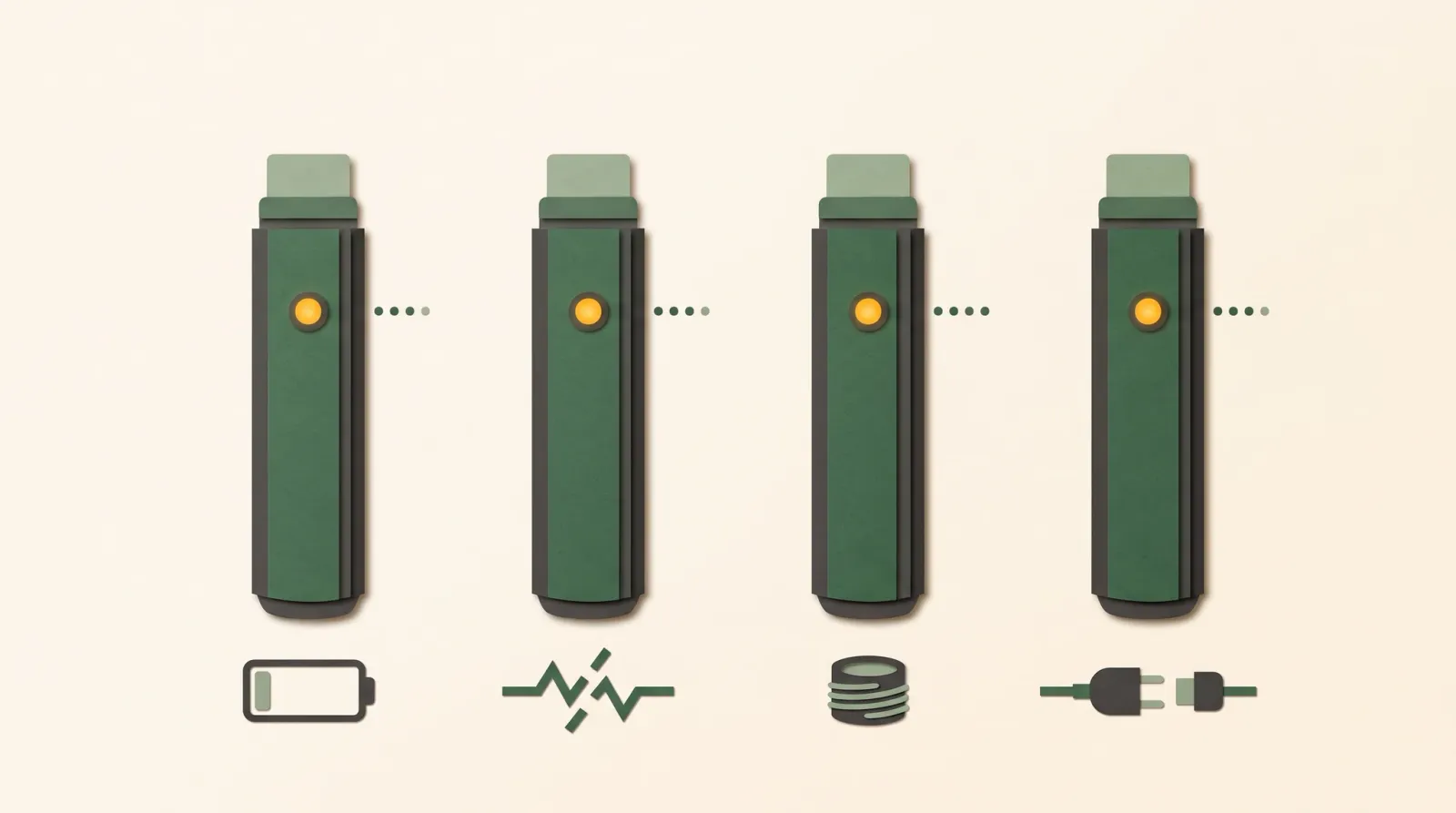
A blinker is one long, continuous pull on a vape, held until the battery’s safety cutoff fires and the light blinks. That is the slang. The catch is that a blinking light is not always a blinker. Battery makers use the same flash count for completely different things, so “it blinked” can mean “you hit the timer”, “charge me”, “something is shorting” or “I can’t find a cartridge”.
Here is the specific to send the friend who swears three blinks always means a dead battery. According to the manufacturers’ own pages, three flashes means a low battery on a Dip Devices 510 battery, a short circuit on the Yocan UNI S, no cartridge on the Pulsar 510 DL 6.0, and an unplugged charging cable on the CCELL Palm. Same light, four meanings.
This High School lesson does two jobs. It defines the slang, and it shows you how to read the light on your own battery without trusting a “universal” chart.
What does “hitting a blinker” mean?
It means drawing on a vape without stopping until the device cuts power on its own and the light flashes. CCELL, a maker of cartridge hardware and batteries, defines it the same way: a long draw “stopping only once the vape blinks to indicate the auto shut-off feature has been activated.” CCELL
The blink in a blinker is a timer, not a fault. The battery has a built-in limit on how long it will keep the coil powered in one go. When you reach that limit, it cuts power to the coil and flashes to tell you why.
That cutoff exists to protect the device. CCELL says auto shut-off keeps a pen from heating continuously, including when a button gets pressed by accident in a pocket. CCELL It is not there to measure a serving.
How long is a blinker?
On many cannabis 510 batteries, the cutoff is about 10 seconds, but that is common, not a standard. Here is what the manuals say:
- The CCELL Palm and the CCELL M3B Pro manuals both say the inhale protection “will cut off any session over 10 seconds.” CCELL Palm manual; CCELL M3B Pro manual
- The Pulsar 510 DL 6.0 uses a “10-second session timer”, and the Pulsar DL Centro flashes red after 10 seconds of continuous use. Pulsar DL 6.0 manual; Pulsar DL Centro manual
- Dip Devices calls 10 seconds a “typical” safety limit. Dip Devices support
- The Yocan Kodo Pro box mod runs its session mode for 15 seconds, then its screen flashes “Over Time”. Yocan Kodo Pro manual
- Outside cannabis hardware, Vaporesso, a nicotine-device maker, lists an 8-second puff limit on the models it covers. Vaporesso
So a blinker on one battery is not the same length as a blinker on another. CCELL’s own explainer puts a blinker at “usually between 8-10 seconds” and says the time differs by battery. CCELL
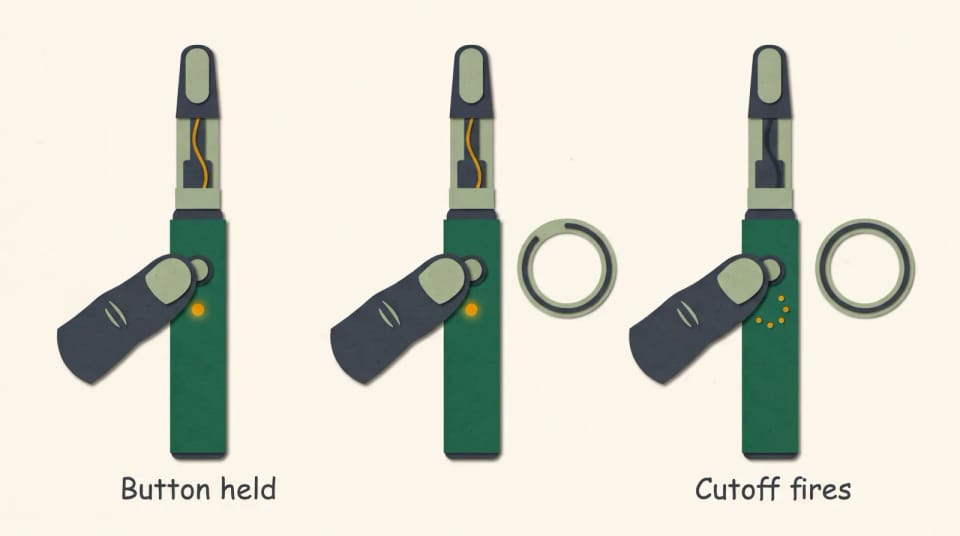
A blinker ends when the battery’s own timer cuts power. The flash reports the cutoff; it does not measure how much you inhaled.
Does a blinker get you higher?
No source we opened measured that, so we will not claim it either way. The cutoff limits how long the coil runs. It does not tell you how much THC left the cartridge, and a puff counter or a timer is not a dose. Our lesson on why puff counts and cutoffs are not a dose walks through that problem.
A cutoff also does not mean the coil stayed cool. In a bench study of three cartridge and battery systems, the voltage setting was a poor guide to coil temperature, and only the temperature-controlled system stayed under 400 °C for the whole simulated puff. Oar et al., PLOS ONE 2022 That study did not test blinkers or effects. It shows only that a time limit and a temperature limit are different things. For the full picture, see why volts do not tell you the temperature.
Why is my vape battery blinking if I didn’t hold it down?
Because the same light also reports charging, low power and connection faults. A blinking light has at least five unrelated causes:
- The cutoff fired. You held the button or drew past the timer.
- The battery is low or dead. Many batteries flash a set number of times instead of firing.
- There is a short circuit or bad contact. The battery sees a fault in the connection to the cartridge.
- It cannot detect a cartridge. The cart is loose, dirty at the contact, or not making a connection.
- It is reporting a charging event. Some batteries blink when the cable comes off or when charging finishes.
Pages that publish one “universal” blink chart treat all of these as one code. The manufacturers’ own pages show why that fails.
What do 3, 5 and 10 blinks mean?
It depends on the model, and the same count can mean opposite things. This table uses only the manufacturer’s own manual or support page for each battery. A blank means the source lists no meaning for that count.
| Battery (manufacturer source) | 3 flashes | 5 flashes | 10 flashes | Other signals |
|---|---|---|---|---|
| Dip Devices 510 battery | Battery is low | Short circuit, or cart screwed in too tight | Auto-shutoff after holding too long | n/a |
| Yocan UNI S | Short circuit (all three lights) | No atomizer detected (all three lights) | Low battery | n/a |
| Pulsar DL Centro | Red: short circuit. White: no cartridge or dead cartridge | n/a | Red: dead battery | Red flash after 10 seconds of use |
| Pulsar 510 DL 6.0 | No cartridge | n/a | n/a | 4 flashes: short circuit |
| CCELL Palm | Charging cable disconnected | n/a | n/a | 20 flashes: fully charged |
Look at the 10 column. On the Yocan UNI S and the Pulsar DL Centro, ten flashes means the battery needs power. On the Dip Devices battery, ten flashes means you just hit the timer, which is a blinker. On the Pulsar DL Centro, colour matters as much as count: three red flashes and three white flashes are different faults.
Even one brand is not consistent across its own line. ACTIVE Vapor Devices lists its 10-second draw signal as two flashes on several models, five flashes on one, and the light simply turning off on others. ACTIVE Vapor Devices Vaporesso shows the same pattern in nicotine devices: three flashes is a low battery on one of its models and overheating on another. Vaporesso
Some manuals list no fault codes at all. The CCELL M3B Pro manual describes charging lights and the 10-second cutoff, but no fault blink table. CCELL M3B Pro manual Model lines also change, so match the model name printed on your battery, not just the brand.
How do I figure out what my battery’s blinks mean?
Treat the light as a clue that needs your battery’s own key. Work through it in this order:
- Note what the light did. Count the flashes, note the colour, and note when it happened: during a draw, on a button press, after a long pull, or while charging.
- Find the model name. Read it off the battery or its box. A brand name alone is not enough.
- Open that model’s manual. Use the manufacturer’s site or support page and match count, colour and timing to its list.
- Try only the listed fix. Charge it as directed. If the manual points to a short or a cart it cannot detect, unscrew the cart slightly, clean the contacts the way the manual describes, or try a different cartridge.
- Stop if the battery is damaged. Hot, swollen, leaking or cracked batteries are not a troubleshooting project.
Manufacturers do list a few common remedies. Dip Devices names a cart “screwed in too tight” as a cause of its five-flash code. Dip Devices support Yocan’s manual for its Kodo Pro says overtightening can stop the battery from reading the cartridge, and Yocan’s reply on its UNI S page says a five-flash UNI cannot detect the cartridge and suggests cleaning the contacts or trying a new cart. Yocan Kodo Pro manual; Yocan UNI S page
Do not pry up the centre contact, bridge the contacts with metal, or try to defeat the cutoff. Those moves trade a blinking light for a real hazard.
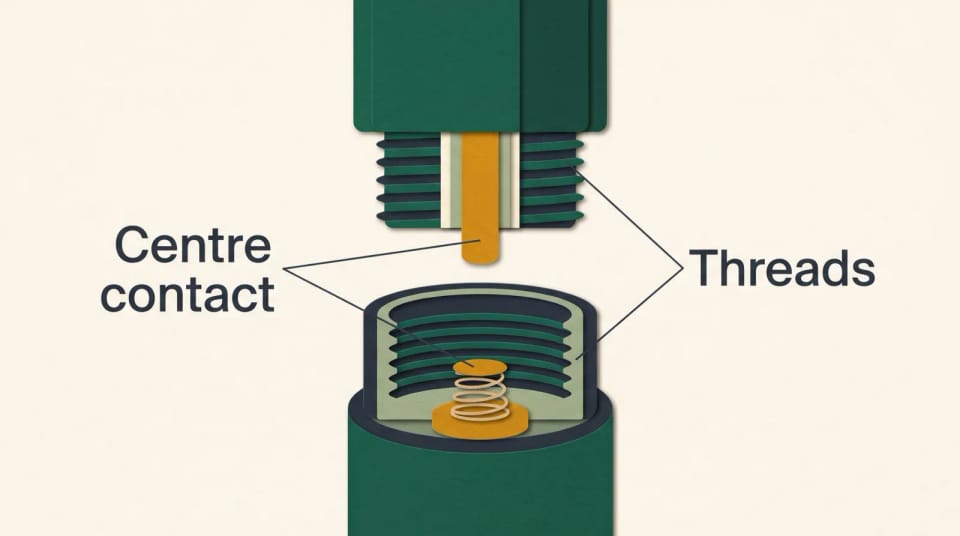
The battery reads the cartridge through a small centre contact inside the threads. Over-tightening or dirt there is a common, manufacturer-listed cause of short and no-cart codes.
If the light is fine but the cart still won’t draw, the battery may not be the problem at all. Our guide to fixing a clogged cart and burnt hits covers airflow, thick oil and contact problems step by step. If a brand-new cart refuses to fire on a battery that works with everything else, read up on spotting a counterfeit cart, since poorly made hardware is one possible cause.
Do disposables blink too?
Yes. All-in-one disposables use the same kind of cutoff and indicator light, and CCELL’s explainer on blinkers is written about disposable pens. CCELL The difference is that you cannot swap a disposable’s battery or try a different cart on it. Our comparison of cartridge vs disposable vapes covers what that trade-off means for lifespan and repairs.
If you are shopping for a new battery, pick one whose maker publishes a clear blink table for that exact model. Our guide to choosing a cannabis vaporizer covers the other things to weigh, and why vape hardware matters explains why the metal parts are worth caring about.
The High IQ app can track how a strain worked for you, so you are not relying on memory to tell one cart from another.
When is a blinking battery a safety problem?
When it is hot, swollen, leaking or damaged, stop using it. The U.S. Food and Drug Administration says vape battery fires and explosions appear uncommon but can be dangerous. It advises following the manufacturer’s recommendations, using only the batteries the maker recommends, charging on a clean, flat surface where you can see the device, never on a couch or pillow, and keeping batteries away from extreme heat or cold. FDA
Keep a dead or damaged battery out of the household trash. See how to dispose of vape batteries and carts.
When to talk to a clinician
This article is about hardware, not health advice. If you have chest pain, trouble breathing, a cough that won’t settle, wheezing or dizziness after vaping, or a burn from a battery, contact a clinician or urgent care. Call emergency services for severe breathing trouble or a serious burn.
Key takeaways
- A blinker is one long pull held until the battery’s safety cutoff fires and the light flashes.
- About 10 seconds is common on cannabis 510 batteries, but cutoffs vary by model.
- The same flash count means different things on different batteries, even inside one brand.
- Decode a blink with your exact model’s manual: count, colour and timing.
- A cutoff is a time limit, not a dose and not a temperature guarantee.
FAQ
How many seconds is a blinker?
It is as long as your battery’s cutoff, which is commonly about 10 seconds on cannabis 510 batteries. The CCELL Palm, the CCELL M3B Pro and the Pulsar DL 6.0 all list 10 seconds. Other devices differ, such as a 15-second session mode on one box mod.
Is a blinker always 10 seconds?
No. Ten seconds is common, not a rule. Manuals show 10 seconds on several cannabis batteries, 15 seconds on one box mod’s session mode, and 8 seconds on a nicotine device family. Check your own model’s manual.
Why does my vape blink 3 times?
It depends on your model. On the manufacturers’ own pages, three flashes means a low battery on a Dip Devices 510 battery, a short circuit on the Yocan UNI S, no cartridge on the Pulsar 510 DL 6.0, and an unplugged charging cable on the CCELL Palm. Match the count and colour to your battery’s manual.
Why does my vape battery blink while charging?
Many batteries use the light to report charging events, not only faults. The CCELL Palm’s manual, for example, says the light blinks three times when the cable is disconnected and 20 times when the battery is full. If the battery gets hot or swells while charging, unplug it and stop using it.
Can I work out a blinker’s THC dose?
No. The cutoff limits how long the coil runs, but it does not tell you how much THC you inhaled. Oil, hardware and how you draw all change the amount. Our lesson on why puff counts mislead explains the details.
Sources
Manufacturer manuals and support pages:
- CCELL blog on hitting a blinker and why disposable pens blink, July 2023
- CCELL Palm user manual, device.report copy
- CCELL M3B Pro user manual, ManualsLib listing
- Yocan UNI S manual page, Yocan site
- Yocan Kodo Pro box mod manual, Yocan site
- Pulsar 510 DL Centro instruction manual, device.report copy
- Pulsar 510 DL 6.0 instruction manual, PU-0880-25, retailer-hosted copy
- Dip Devices support page for its 510 battery
- ACTIVE Vapor Devices battery tips by model
- Vaporesso guide to blinking lights on its nicotine devices
Government and research:
- FDA tips to help avoid vape battery fires or explosions
- Oar MA, Savage CH, Rufer ES, Rucker RP, Guzman JA. (2022). Thermography of cannabis extract vaporization cartridge heating coils in temperature- and voltage-controlled systems during a simulated human puff. PLOS ONE, 17(1), e0262265. doi:10.1371/journal.pone.0262265
Manufacturer pages checked October 29, 2026. Model lines change; match the model name printed on your battery.